Pandas에서 수정하는 방법: typeerror: 플롯할 숫자 데이터가 없습니다.
pandas를 사용할 때 발생할 수 있는 오류는 다음과 같습니다.
TypeError : no numeric data to plot
이 오류는 Pandas DataFrame에서 값을 플롯하려고 시도했지만 플롯할 숫자 값이 없을 때 발생합니다.
이 오류는 일반적으로 DataFrame의 특정 열이 숫자라고 생각했지만 데이터 유형이 다른 것으로 판명될 때 발생합니다.
다음 예에서는 실제로 이 오류를 수정하는 방법을 보여줍니다.
오류를 재현하는 방법
다음과 같은 팬더 DataFrame이 있다고 가정합니다.
 import pandas as pd

#createDataFrame
df = pd. DataFrame ({' team ': ['A', 'A', 'B', 'B', 'B'],
                   ' points ': ['5', '7', '7', '9', '12'],
                   ' rebounds ': ['11', '8', '10', '6', '6'],
                   ' blocks ': ['4', '7', '7', '6', '5']})

#view DataFrame
df

	team points rebound blocks
0 A 5 11 4
1 To 7 8 7
2 B 7 10 7
3 B 9 6 6
4 B 12 6 5
이제 숫자라고 생각되는 세 가지 변수(점, 바운스 및 블록)에 대한 선형 플롯을 생성하려고 한다고 가정합니다.
 #attempt to create line plot for points, rebounds, and blocks
df[[' points ', ' rebounds ', ' blocks ']]. plot ()

ValueError : no numeric data to plot
이 열 중 실제로 숫자가 아니기 때문에 오류가 발생합니다.
오류를 수정하는 방법
dtypes 함수를 사용하여 DataFrame의 각 열이 어떤 데이터 유형에 속하는지 확인할 수 있습니다.
 #display data type of each column in DataFrame
df. dtypes

team object
points object
rebound object
blocks object
dtype:object
DataFrame의 어떤 열도 숫자가 아니라는 것을 알 수 있습니다.
.astype() 함수를 사용하여 특정 열을 숫자 값으로 변환할 수 있습니다.
 #convert points, rebounds, and blocks columns to numeric
df[' points ']=df[' points ']. astype (float)
df[' rebounds ']=df[' rebounds ']. astype (float)
df[' blocks ']=df[' blocks ']. astype (float)
그런 다음 플롯() 함수를 재사용할 수 있습니다.
 #create line plot for points, rebounds, and blocks
df[[' points ', ' rebounds ', ' blocks ']]. plot ()
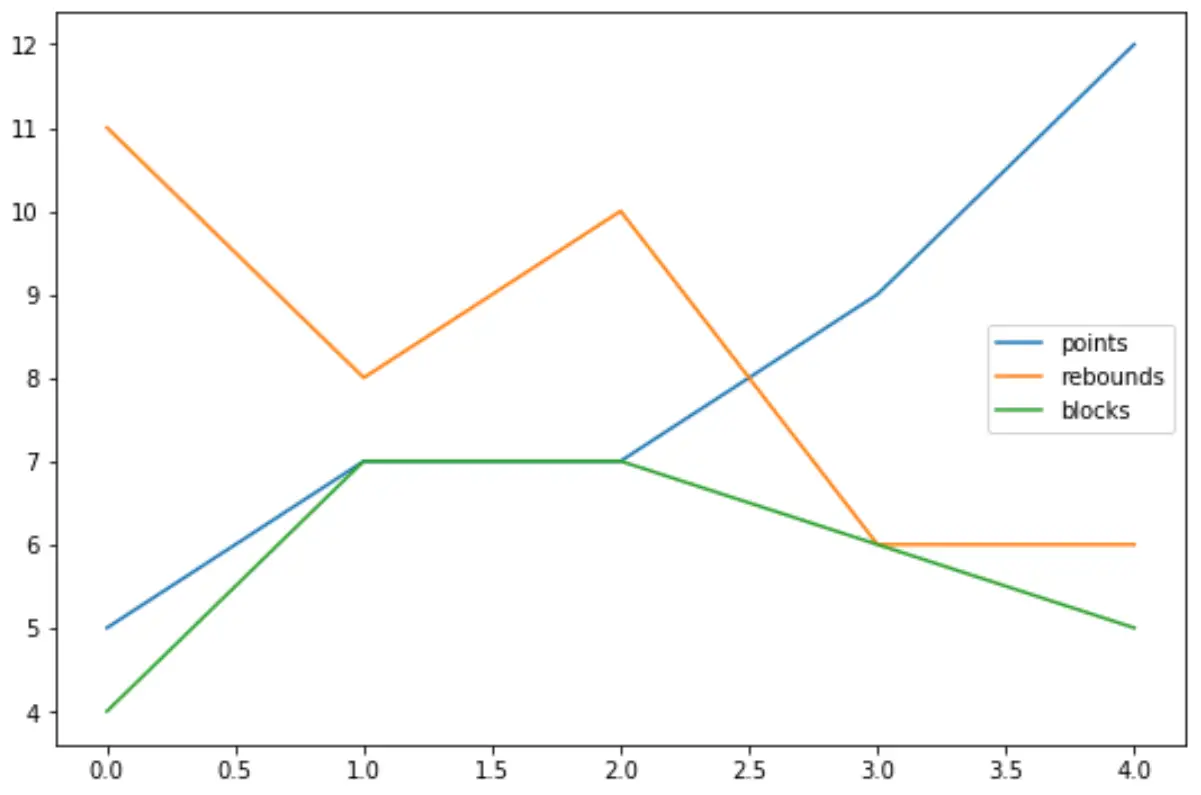
이제 각 변수가 숫자이기 때문에 점, 바운스 및 블록에 대한 선형 플롯을 성공적으로 생성할 수 있습니다.
dtypes 함수를 다시 사용하여 이를 확인할 수 있습니다:
 #display data type of each column in DataFrame
df. dtypes

team object
float64 points
rebounds float64
blocks float64
dtype:object
추가 리소스
다음 튜토리얼에서는 Python의 다른 일반적인 오류를 수정하는 방법을 설명합니다.
Pandas에서 KeyError를 수정하는 방법
수정 방법: ValueError: float NaN을 int로 변환할 수 없습니다.
해결 방법: ValueError: 피연산자를 모양과 함께 브로드캐스트할 수 없습니다.
저자 소개

벤자민 앤더슨
안녕하세요. 저는 통계학 교수를 퇴직하고 전임 통계 교사로 변신한 벤자민입니다. 통계 분야의 광범위한 경험과 전문 지식을 바탕으로 Statorials를 통해 학생들에게 힘을 실어주기 위해 지식을 공유하고 싶습니다. 더 알아보기