R တွင်ကွက်ကွက်တစ်ခုသို့ regression equation ကိုမည်သို့ထည့်ရမည်နည်း။
မကြာခဏဆိုသလို သင်သည် အောက်ပါအတိုင်း R တွင် ကွက်ကွက်တစ်ခုသို့ ဆုတ်ယုတ်ညီမျှခြင်းတစ်ခုကို ထည့်လိုပေမည်။
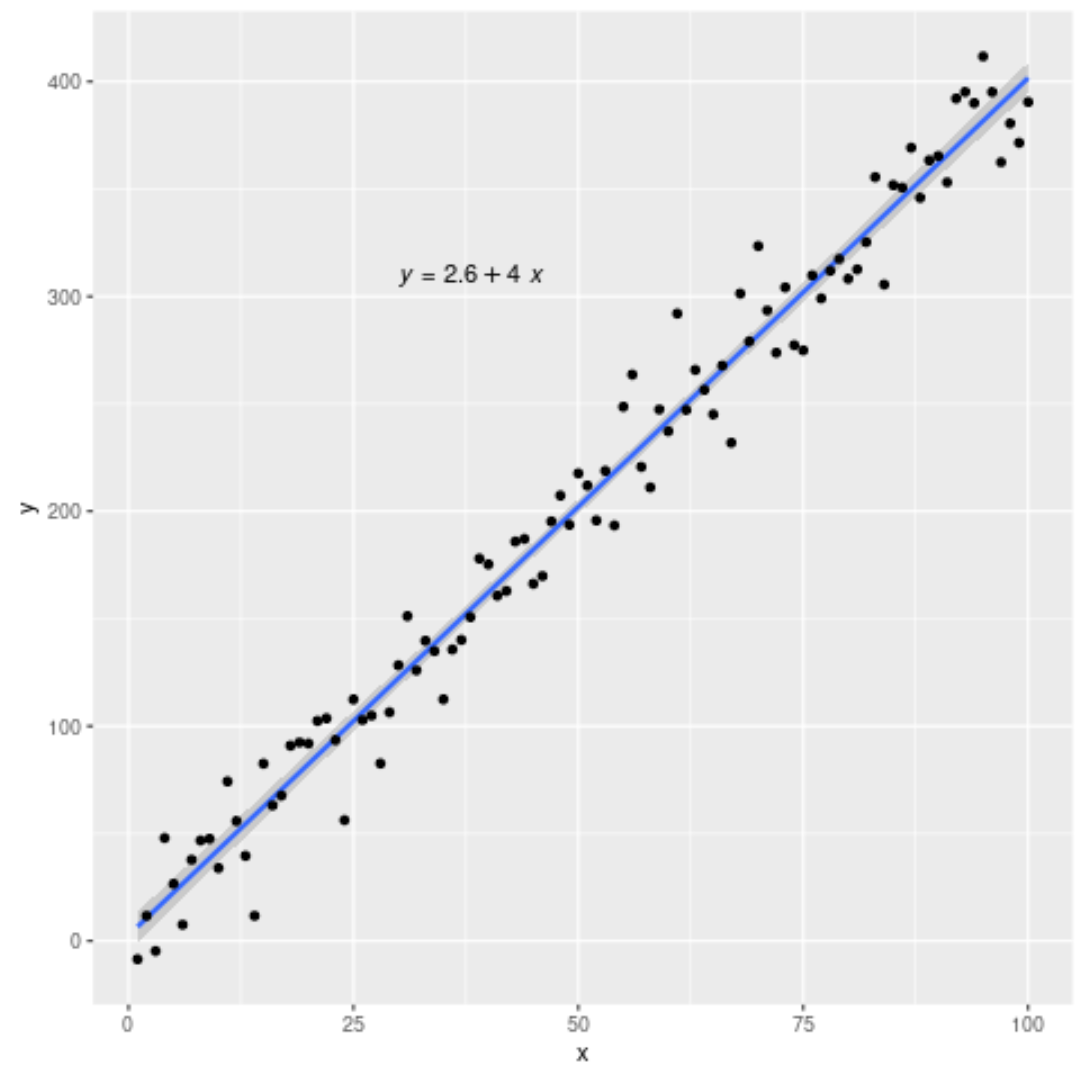
ကံကောင်းထောက်မစွာ၊ ၎င်းသည် ggplot2 နှင့် ggpubr ပက်ကေ့ဂျ်များရှိ လုပ်ဆောင်ချက်များကို အသုံးပြု၍ လုပ်ဆောင်ရန် အလွန်လွယ်ကူသည်။
ဤသင်ခန်းစာသည် R ရှိကွက်တစ်ခုသို့ ဆုတ်ယုတ်ညီမျှခြင်းတစ်ခုထည့်ရန် ဤပက်ဂျ်များတွင် လုပ်ဆောင်ချက်များကို အသုံးပြုနည်းအဆင့်ဆင့် ဥပမာကို ပေးပါသည်။
အဆင့် 1: ဒေတာကိုဖန်တီးပါ။
ဦးစွာ၊ ဒေတာအတုအချို့ကို ဖန်တီးကြပါစို့-
 #make this example reproducible
set. seeds (1)

#create data frame
df <- data. frame (x = c(1:100))
df$y <- 4*df$x + rnorm(100, sd=20)

#view head of data frame
head(df)

  xy
1 1 -8.529076
2 2 11.672866
3 3 -4.712572
4 4 47.905616
5 5 26.590155
6 6 7.590632
အဆင့် 2- regression equation ဖြင့် ကွက်ကွက်ကို ဖန်တီးပါ။
ထို့နောက်၊ တပ်ဆင်ထားသော regression line နှင့် equation ဖြင့် scatterplot တစ်ခုကို ဖန်တီးရန် အောက်ပါ syntax ကို အသုံးပြုပါမည်။
 #load necessary libraries
library (ggplot2)
library (ggpubr)

#create plot with regression line and regression equation
ggplot(data=df, aes (x=x, y=y)) +
        geom_smooth(method=" lm ") +
        geom_point() +
        stat_regline_equation(label. x =30, label. y =310)
၎င်းသည် တပ်ဆင်ထားသော ဆုတ်ယုတ်မှုညီမျှခြင်းဖြစ်သည်-
y = 2.6 + 4*(x)
label.x နှင့် label.y သည် ဆုတ်ယုတ်မှုညီမျှခြင်း၏ (x,y) သြဒီနိတ်များကို ဖော်ပြရန်အတွက် သတ်မှတ်ပေးသည်ကို သတိပြုပါ။
အဆင့် 3- R-square ကို ကွက်ကွက်သို့ ထည့်ပါ (ချန်လှပ်ထားနိုင်သည်)
အောက်ဖော်ပြပါ အထားအသိုကိုသုံးလိုပါက regression model ၏ R နှစ်ထပ်ကိန်းတန်ဖိုးကိုလည်း ထည့်နိုင်သည်။
 #load necessary libraries
library (ggplot2)
library (ggpubr)

#create plot with regression line, regression equation, and R-squared
ggplot(data=df, aes (x=x, y=y)) +
        geom_smooth(method=" lm ") +
        geom_point() +
        stat_regline_equation(label. x =30, label. y =310) +
stat_cor( aes (label=..rr.label..), label. x =30, label. y =290)
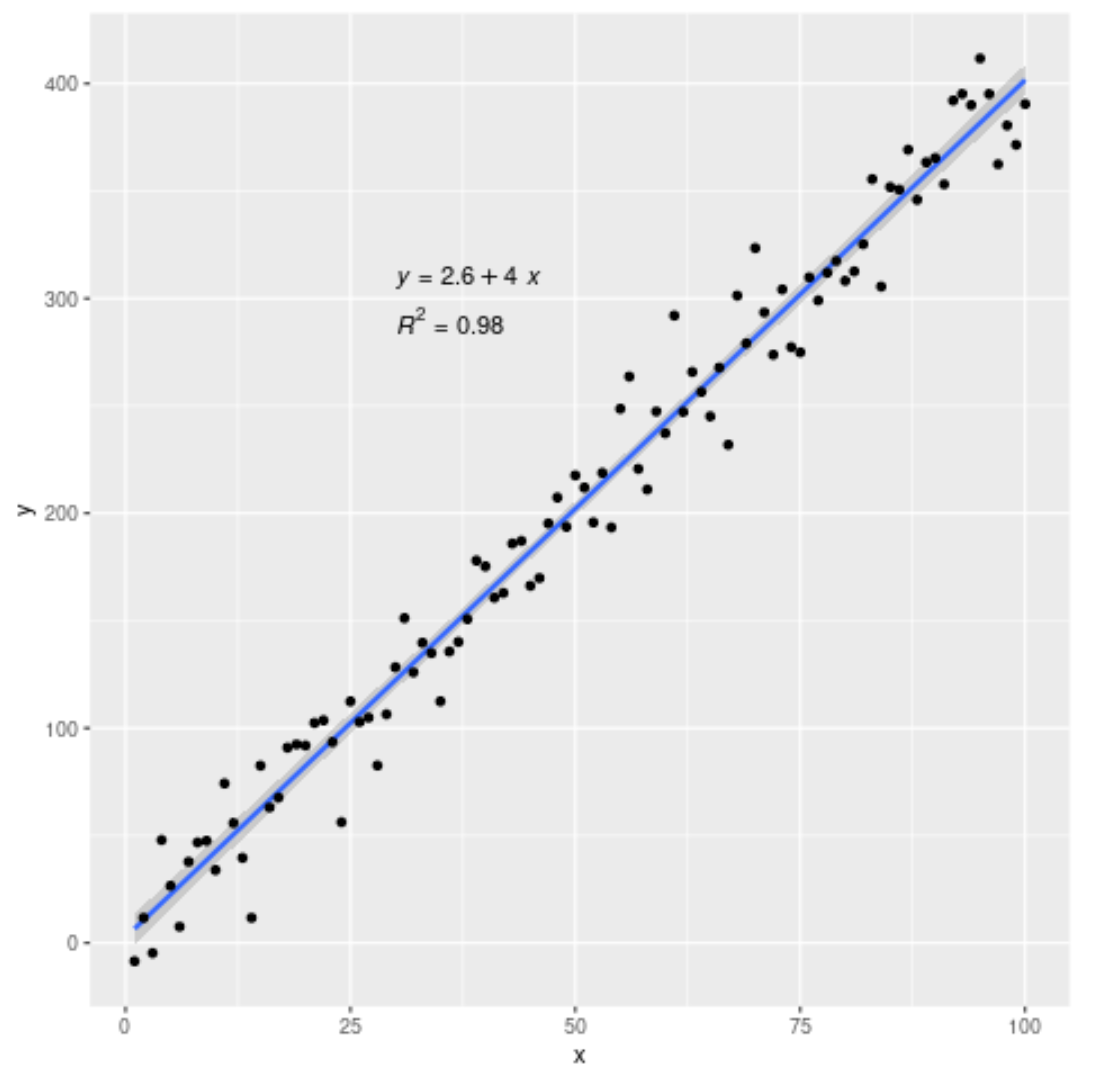
ဤမော်ဒယ်အတွက် R-squared သည် 0.98 ဖြစ်သွားသည်။
နောက်ထပ် R သင်ခန်းစာများကို ဤစာမျက်နှာတွင် သင်တွေ့နိုင်ပါသည်။
စာရေးသူအကြောင်း

Benjamin Anderson
မင်္ဂလာပါ၊ ကျွန်ုပ်သည် အငြိမ်းစား စာရင်းအင်း ပါမောက္ခ ဘင်ဂျမင်ဖြစ်ပြီး သီးသန့် Statorials ဆရာအဖြစ် လှည့်ပတ်ပါသည်။ စာရင်းဇယားနယ်ပယ်တွင် ကျယ်ပြန့်သောအတွေ့အကြုံနှင့် ကျွမ်းကျင်မှုနှင့်အတူ၊ Statorials မှတစ်ဆင့် ကျောင်းသားများကို ခွန်အားဖြစ်စေရန်အတွက် ကျွန်ုပ်၏အသိပညာကို မျှဝေလိုပါသည်။ ပိုသိတယ်။