Ggplot2 တွင် x ဝင်ရိုးအညွှန်းများကိုဘယ်လိုပြောင်းမလဲ။
သင်သည် ggplot2 ရှိ ကွက်ကွက်တစ်ခုပေါ်ရှိ x-axis အညွှန်းများကို ပြောင်းလဲရန် scale_x_discrete() လုပ်ဆောင်ချက်ကို အသုံးပြုနိုင်သည်။
p + scale_x_discrete(labels=c(' label1 ', ' label2 ', ' label3 ', ...))
အောက်ဖော်ပြပါ ဥပမာသည် ဤ syntax ကို လက်တွေ့တွင် မည်သို့အသုံးပြုရမည်ကို ပြသထားသည်။
ဥပမာ- ggplot2 တွင် X ဝင်ရိုးအညွှန်းများကို ပြောင်းပါ။
မတူညီသောဘတ်စကက်ဘောအသင်းများမှ ရမှတ်များကိုပြသသည့် R တွင် အောက်ပါဒေတာဘောင်ရှိသည်ဆိုပါစို့။
 #create data frame
df <- data. frame (team=c('Mavs', 'Heat', 'Nets', 'Lakers'),
                 dots=c(100, 122, 104, 109))

#view data frame
df

    team points
1 Mavs 100
2 Heat 122
3 Nets 104
4 Lakers 109
အဖွဲ့တစ်ခုစီမှ ရမှတ်များကို မြင်သာစေရန် ဘားကားချပ်တစ်ခု ဖန်တီးပါက၊ ggplot2 သည် x-axis ပေါ်တွင် နေရာချရန် အညွှန်းများကို အလိုအလျောက် ဖန်တီးပေးလိမ့်မည်-
 library (ggplot2)

#create bar plot
ggplot(df, aes(x=team, y=points)) +
  geom_col()
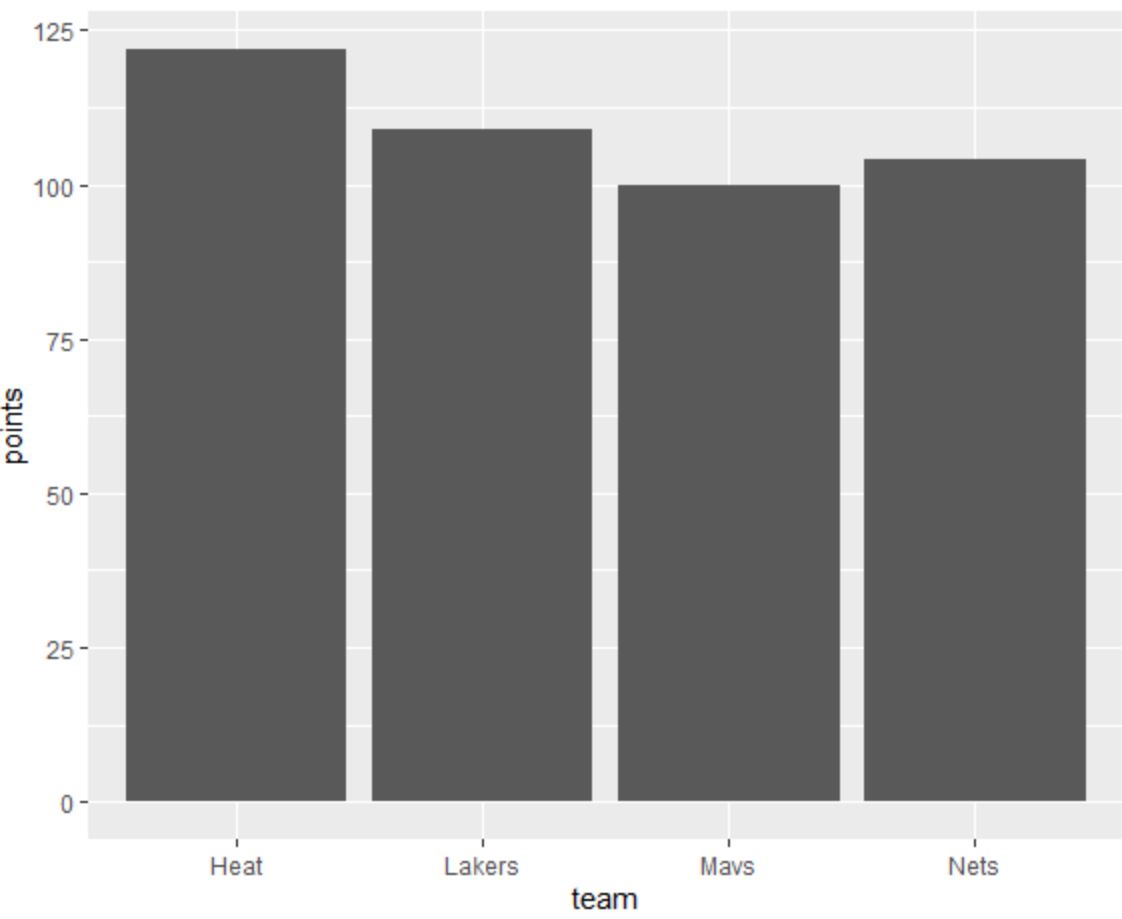
X ဝင်ရိုးအညွှန်းများကို မတူညီသည့်အရာအဖြစ်ပြောင်းလဲရန်၊ ကျွန်ုပ်တို့သည် scale_x_discrete() လုပ်ဆောင်ချက်ကို အသုံးပြုနိုင်ပါသည်။
 library (ggplot2)

#create bar plot with specific axis order
ggplot(df, aes(x=team, y=points)) +
  geom_col() +
  scale_x_discrete(labels=c(' label1 ', ' label2 ', ' label3 ', ' label4 '))
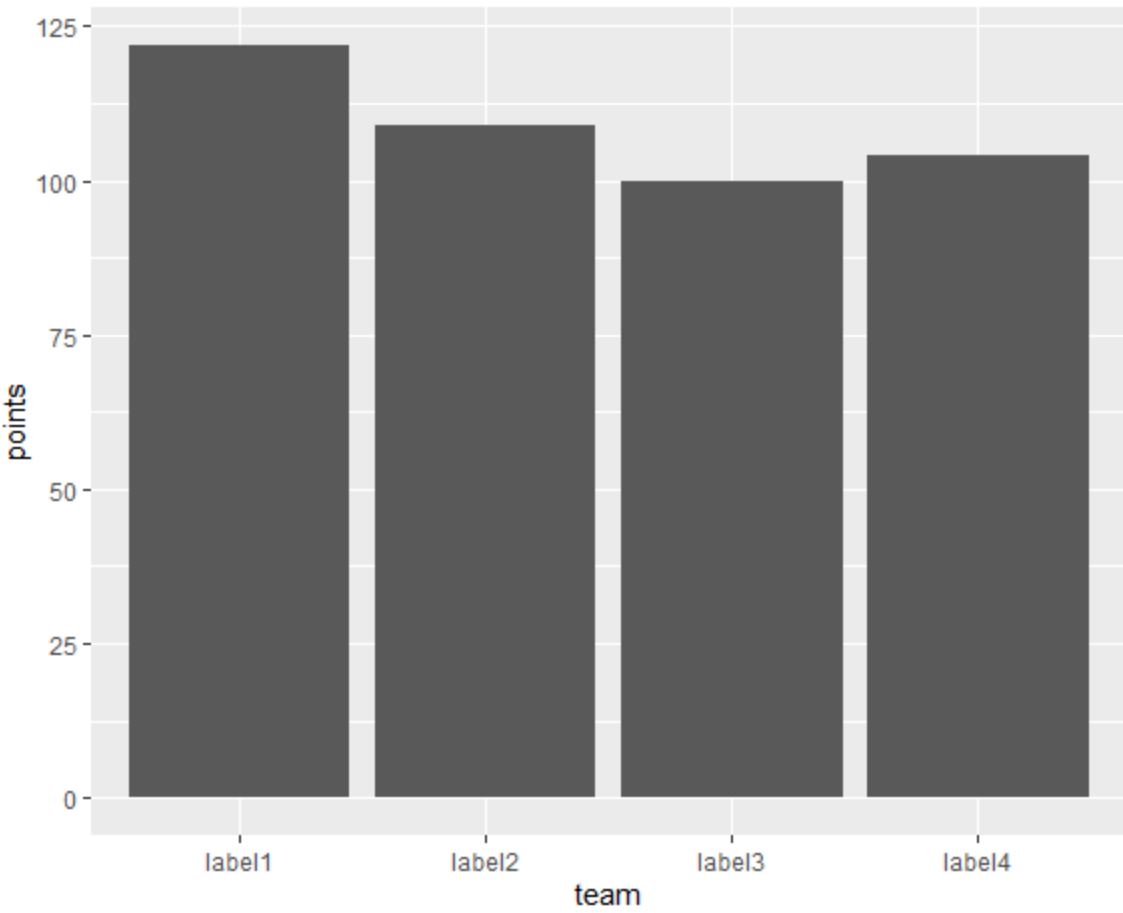
ယခု X ဝင်ရိုးတံဆိပ်များသည် scale_x_discrete() လုပ်ဆောင်ချက်ကို အသုံးပြု၍ ကျွန်ုပ်တို့သတ်မှတ်ထားသော အညွှန်းများနှင့် ကိုက်ညီပါသည်။
သင်အလိုရှိပါက scale_discrete() လုပ်ဆောင်ချက်၏ အပြင်ဘက်ရှိ vector တွင် အညွှန်းများကို သတ်မှတ်နိုင်သည်။
 library (ggplot2)

#specify labels for plot
my_labels <- c(' label1 ', ' label2 ', ' label3 ', ' label4 ')

#create bar plot with specific axis order
ggplot(df, aes(x=team, y=points)) +
  geom_col() +
  scale_x_discrete(labels=my_labels)
ဒါက အရင်ဇာတ်ကွက်နဲ့ လိုက်ဖက်တယ်။
ထပ်လောင်းအရင်းအမြစ်များ
အောက်ဖော်ပြပါ သင်ခန်းစာများသည် ggplot2 တွင် အခြားဘုံအလုပ်များကို မည်သို့လုပ်ဆောင်ရမည်ကို ရှင်းပြသည်-
ggplot2 တွင် ဝင်ရိုးတံဆိပ်များကို လှည့်နည်း
ggplot2 တွင် ဝင်ရိုးကွဲများကို သတ်မှတ်နည်း
ggplot2 တွင် ဝင်ရိုးကန့်သတ်ချက်များကို မည်သို့သတ်မှတ်မည်နည်း။
ggplot2 တွင် ဒဏ္ဍာရီအညွှန်းများကို မည်သို့ပြောင်းရမည်နည်း။
စာရေးသူအကြောင်း

Benjamin Anderson
မင်္ဂလာပါ၊ ကျွန်ုပ်သည် အငြိမ်းစား စာရင်းအင်း ပါမောက္ခ ဘင်ဂျမင်ဖြစ်ပြီး သီးသန့် Statorials ဆရာအဖြစ် လှည့်ပတ်ပါသည်။ စာရင်းဇယားနယ်ပယ်တွင် ကျယ်ပြန့်သောအတွေ့အကြုံနှင့် ကျွမ်းကျင်မှုနှင့်အတူ၊ Statorials မှတစ်ဆင့် ကျောင်းသားများကို ခွန်အားဖြစ်စေရန်အတွက် ကျွန်ုပ်၏အသိပညာကို မျှဝေလိုပါသည်။ ပိုသိတယ်။