Vba- တူညီသောတန်ဖိုးများဖြင့် ဆဲလ်များကို ပေါင်းစည်းနည်း
သီးခြားအကွာအဝေးတစ်ခုအတွင်း တူညီသောတန်ဖိုးများဖြင့် ဆဲလ်များကို ပေါင်းစည်းရန် VBA တွင် အောက်ပါ syntax ကို သင်အသုံးပြုနိုင်သည်-
 Sub MergeSameCells()

    'turn off display alerts while merging
    Application.DisplayAlerts = False

    'specify range of cells for merging
    Set myRange = Range(" A1:C13 ")

'merge all same cells in range
MergeSame:
    For Each cell In myRange
        If cell.Value = cell.Offset(1, 0).Value And Not IsEmpty(cell) Then
            Range(cell, cell.Offset(1, 0)).Merge
            cell.VerticalAlignment = xlCenter
            GoTo MergeSame
        End If
    Next

    'turn display alerts back on
    Application.DisplayAlerts = True

End Sub
ဤအထူးသဖြင့် macro သည် A1:C13 အကွာအဝေးရှိ တူညီသောတန်ဖိုးများနှင့် ဆဲလ်များကို ပေါင်းစည်းသည်။
အောက်ဖော်ပြပါ ဥပမာသည် ဤ syntax ကို လက်တွေ့တွင် မည်သို့အသုံးပြုရမည်ကို ပြသထားသည်။
ဥပမာ- VBA တွင် တူညီသောတန်ဖိုးများဖြင့် ဆဲလ်များကို ပေါင်းစည်းပါ။
ကျွန်ုပ်တို့တွင် ဘတ်စကက်ဘောကစားသမားအမျိုးမျိုးမှ ရမှတ်ရမှတ်များအကြောင်း အချက်အလက်ပါရှိသော Excel တွင် အောက်ပါဒေတာအတွဲရှိသည်ဆိုပါစို့။
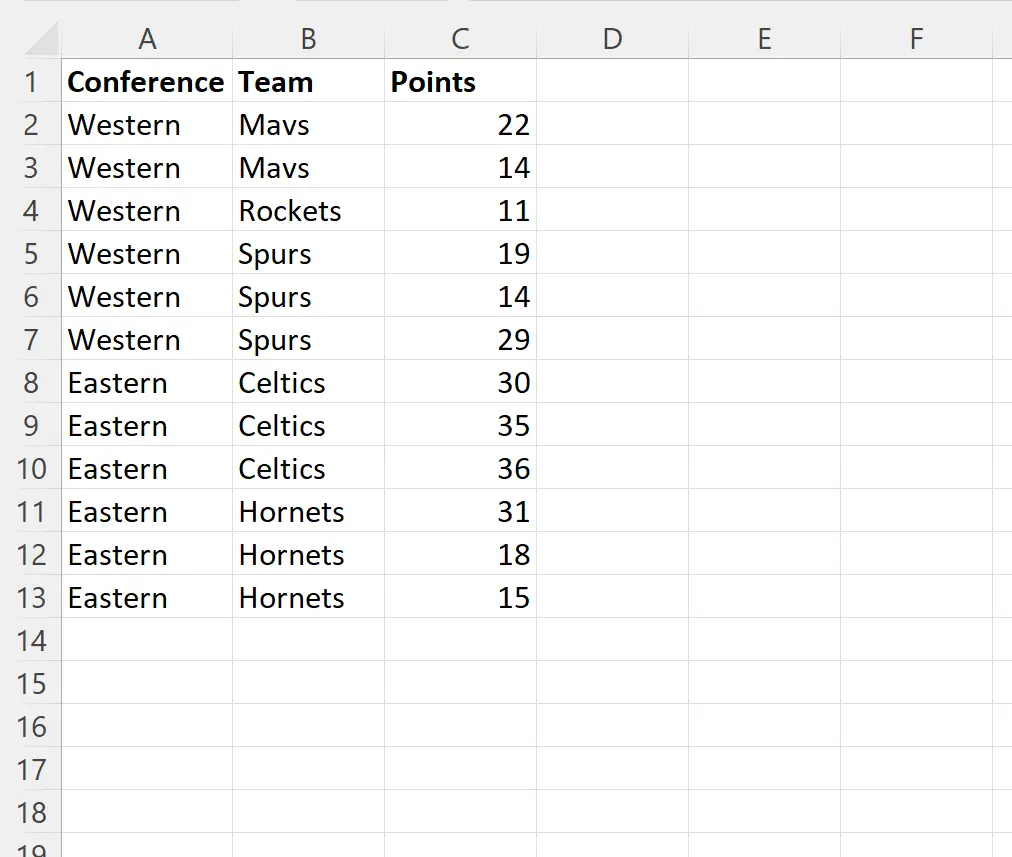
ကျွန်ုပ်တို့သည် အတန်းတူတန်ဖိုးများနှင့် ဆဲလ်များကို ဆက်တိုက်ပေါင်းစည်းလိုသည်ဆိုပါစို့။
ဒါကိုလုပ်ဖို့ အောက်ပါ macro ကို ဖန်တီးနိုင်ပါတယ်။
 Sub MergeSameCells()

    'turn off display alerts while merging
    Application.DisplayAlerts = False

    'specify range of cells for merging
    Set myRange = Range(" A1:C13 ")

'merge all same cells in range
MergeSame:
    For Each cell In myRange
        If cell.Value = cell.Offset(1, 0).Value And Not IsEmpty(cell) Then
            Range(cell, cell.Offset(1, 0)).Merge
            cell.VerticalAlignment = xlCenter
            GoTo MergeSame
        End If
    Next

    'turn display alerts back on
    Application.DisplayAlerts = True

End Sub
ကျွန်ုပ်တို့ ဤ macro ကို run သောအခါတွင်၊ ကျွန်ုပ်တို့သည် အောက်ပါ output ကို ရရှိသည် ။
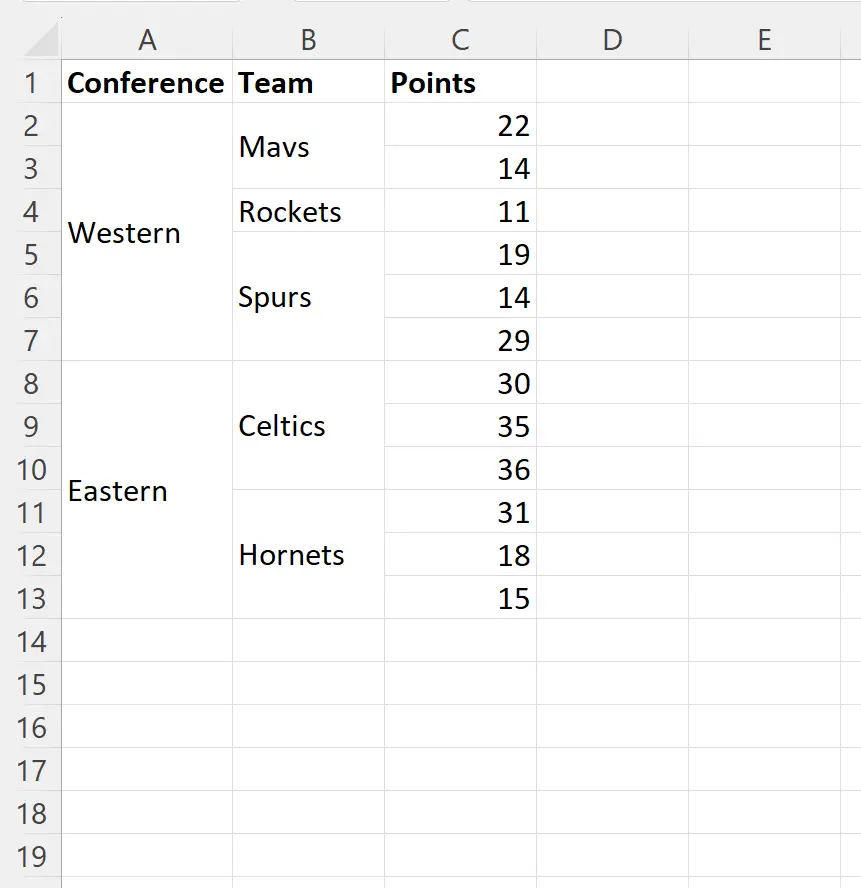
တူညီသော ကွန်ဖရင့် အမည်နှင့် အဖွဲ့ အမည်ပါရှိသော ဆဲလ်တစ်ခုစီကို ပေါင်းစည်းလိုက်ကြောင်း သတိပြုပါ။
စာသားကို ပေါင်းစည်းထားသောဆဲလ်များတွင် ဒေါင်လိုက်ဗဟိုပြုသင့်ကြောင်း သတ်မှတ်ရန် cell.VerticalAlignment = xlCenter ကြေညာချက်ကို ကျွန်ုပ်တို့အသုံးပြုခဲ့ကြောင်း သတိပြုပါ။
ထပ်လောင်းအရင်းအမြစ်များ
အောက်ဖော်ပြပါ သင်ခန်းစာများသည် VBA တွင် အခြားဘုံအလုပ်များကို မည်သို့လုပ်ဆောင်ရမည်ကို ရှင်းပြသည်-
VBA- အသုံးပြုထားသော ကော်လံအရေအတွက်ကို ရေတွက်နည်း
VBA- အတန်းအမြင့်ကို ဘယ်လိုပြောင်းမလဲ။
VBA- ကော်လံအကျယ်ကို ဘယ်လိုပြောင်းမလဲ။
စာရေးသူအကြောင်း

Benjamin Anderson
မင်္ဂလာပါ၊ ကျွန်ုပ်သည် အငြိမ်းစား စာရင်းအင်း ပါမောက္ခ ဘင်ဂျမင်ဖြစ်ပြီး သီးသန့် Statorials ဆရာအဖြစ် လှည့်ပတ်ပါသည်။ စာရင်းဇယားနယ်ပယ်တွင် ကျယ်ပြန့်သောအတွေ့အကြုံနှင့် ကျွမ်းကျင်မှုနှင့်အတူ၊ Statorials မှတစ်ဆင့် ကျောင်းသားများကို ခွန်အားဖြစ်စေရန်အတွက် ကျွန်ုပ်၏အသိပညာကို မျှဝေလိုပါသည်။ ပိုသိတယ်။