Ggplot2 တွင် ဒဏ္ဍာရီခေါင်းစဉ်တစ်ခုကို ဖယ်ရှားနည်း
ggplot2 ရှိ ကွက်ကွက်တစ်ခုမှ ဒဏ္ဍာရီ ခေါင်းစဉ်တစ်ခုကို ဖယ်ရှားရန် အောက်ပါ syntax ကို အသုံးပြုနိုင်သည်။
 ggplot(df, aes(x=x_var, y=y_var, color=group_var)) +
  geom_point() +
  labs(color= NULL )
labs() လုပ်ဆောင်ချက်ရှိ color=NULL အငြင်းအခုံသည် ggplot2 သည် မည်သည့်ဒဏ္ဍာရီခေါင်းစဉ်များကိုမျှ မပြသရန် ပြောထားသည်။
အောက်ဖော်ပြပါ ဥပမာသည် ဤ syntax ကို လက်တွေ့တွင် မည်သို့အသုံးပြုရမည်ကို ပြသထားသည်။
ဥပမာ- ggplot2 ရှိ plot legend မှ ခေါင်းစဉ်ကို ဖယ်ရှားပါ။
R တွင် ဘတ်စကက်ဘောကစားသမားများအကြောင်း အချက်အလက်များစွာပါရှိသော အောက်ပါဒေတာဘောင်ရှိသည်ဆိုပါစို့။
 df <- data. frame (assists=c(3, 4, 4, 3, 1, 5, 6, 7, 9),
                 points=c(14, 8, 8, 16, 3, 7, 17, 22, 26),
                 position=rep(c('Guard', 'Forward', 'Center'), times= 3 ))

#view data frame
df

  assist points position
1 3 14 Guard
2 4 8 Forward
3 4 8 Center
4 3 16 Guard
5 1 3 Forward
6 5 7 Center
7 6 17 Guard
8 7 22 Forward
9 9 26 Center
ggplot2 တွင် point cloud တစ်ခုဖန်တီးရန် geom_point() ကို အသုံးပြုပါက၊ ဒဏ္ဍာရီတစ်ခုသည် မူရင်းခေါင်းစဉ်ဖြင့် ပြသလိမ့်မည်-
 library (ggplot2)

#create scatter plot of assists vs. points, grouped by position
ggplot(df, aes(x=assists, y=points, color=position)) +
  geom_point(size= 3 )
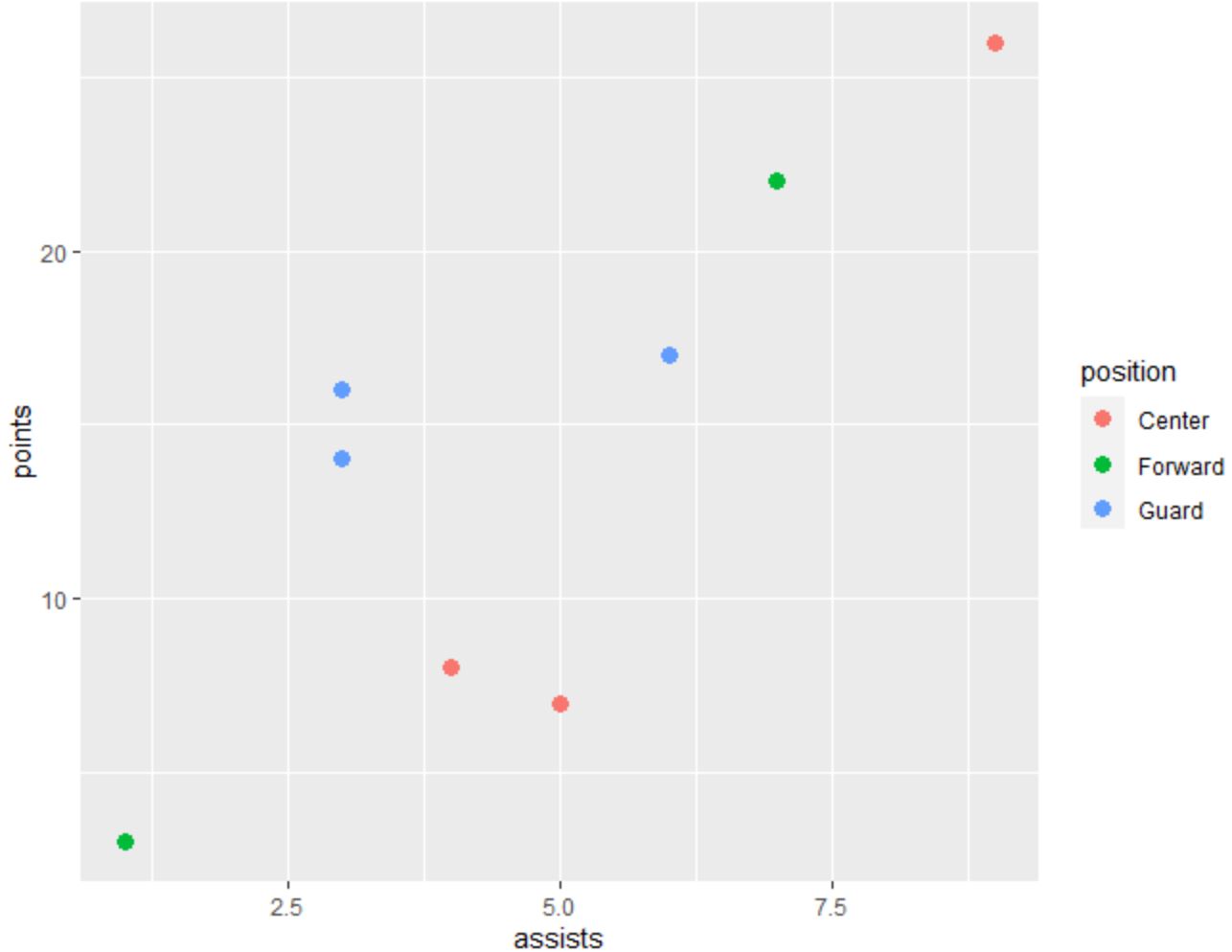
ဒဏ္ဍာရီတွင် လက်ရှိဒဏ္ဍာရီခေါင်းစဉ်အဖြစ် ဖော်ပြထားသည့် စာသား “ အနေအထား” ရှိနေကြောင်း သတိပြုပါ။
ဤခေါင်းစဉ်ကို ဒဏ္ဍာရီမှ ဖယ်ရှားရန်၊ ကျွန်ုပ်တို့သည် labs(color=NULL) အငြင်းအခုံကို အသုံးပြုနိုင်ပါသည်။
 library (ggplot2)

#create scatter plot and remove legend title
ggplot(df, aes(x=assists, y=points, color=position)) +
  geom_point(size= 3 ) +
  labs(color= NULL )
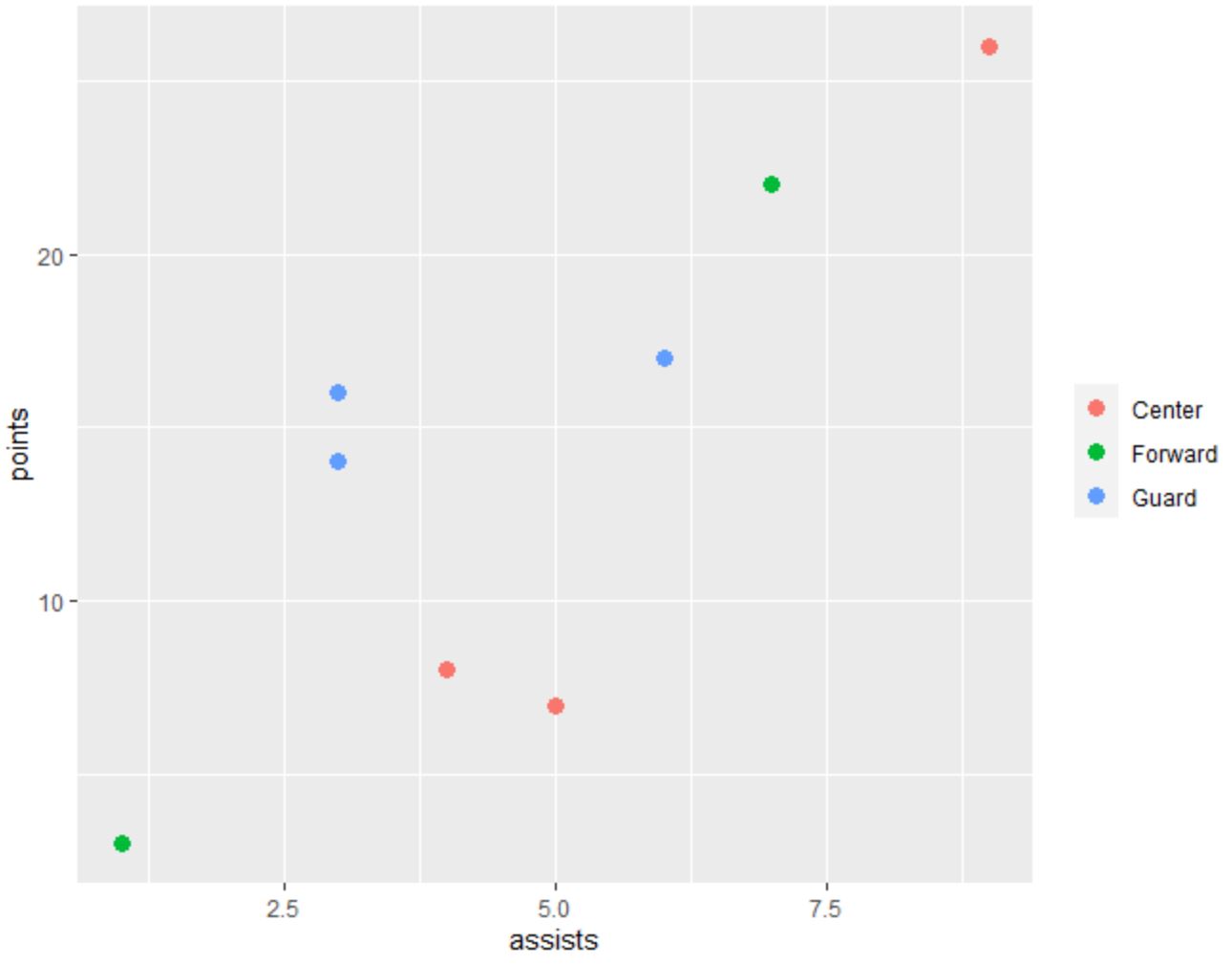
စာတန်းခေါင်းစဉ်ကို ဖယ်ရှားလိုက်ကြောင်း သတိပြုပါ။
ထပ်လောင်းအရင်းအမြစ်များ
အောက်ဖော်ပြပါ သင်ခန်းစာများသည် ggplot2 တွင် အခြားဘုံအလုပ်များကို မည်သို့လုပ်ဆောင်ရမည်ကို ရှင်းပြသည်-
ggplot2 တွင်ဒဏ္ဍာရီခေါင်းစဉ်ကိုဘယ်လိုပြောင်းမလဲ။
ggplot2 တွင် ဒဏ္ဍာရီအရွယ်အစားကို မည်သို့ပြောင်းလဲမည်နည်း။
ggplot2 တွင် ဒဏ္ဍာရီ အနေအထားကို ဘယ်လိုပြောင်းမလဲ။
စာရေးသူအကြောင်း

Benjamin Anderson
မင်္ဂလာပါ၊ ကျွန်ုပ်သည် အငြိမ်းစား စာရင်းအင်း ပါမောက္ခ ဘင်ဂျမင်ဖြစ်ပြီး သီးသန့် Statorials ဆရာအဖြစ် လှည့်ပတ်ပါသည်။ စာရင်းဇယားနယ်ပယ်တွင် ကျယ်ပြန့်သောအတွေ့အကြုံနှင့် ကျွမ်းကျင်မှုနှင့်အတူ၊ Statorials မှတစ်ဆင့် ကျောင်းသားများကို ခွန်အားဖြစ်စေရန်အတွက် ကျွန်ုပ်၏အသိပညာကို မျှဝေလိုပါသည်။ ပိုသိတယ်။