Seaborn တွင် ဖြန့်ဝေနည်းကို ပုံဆွဲနည်း- ဥပမာများဖြင့်
ပင်လယ်မွေး ဒေတာမြင်ယောင်မှုပြစာကြည့်တိုက်ကို အသုံးပြု၍ Python တွင် တန်ဖိုးများဖြန့်ချီရန် အောက်ပါနည်းလမ်းများကို သင်အသုံးပြုနိုင်သည်-
နည်းလမ်း 1- histogram ကို အသုံးပြု၍ ဖြန့်ဖြူးမှုကို ပုံဖော်ပါ။
sns. displot (data)
နည်းလမ်း 2- သိပ်သည်းဆမျဉ်းကွေးကို အသုံးပြု၍ ဖြန့်ဖြူးမှုကို ပုံဖော်ပါ။
sns. displot (data, kind=' kde ')
နည်းလမ်း 3- histogram နှင့် density မျဉ်းကွေးကို အသုံးပြု၍ ဖြန့်ဖြူးမှုကို ပုံဖော်ပါ။
sns. displot (data, kde= True )
အောက်ဖော်ပြပါ ဥပမာများသည် နည်းလမ်းတစ်ခုစီကို လက်တွေ့အသုံးချနည်းကို ပြသထားသည်။
ဥပမာ 1- Histogram ကို အသုံးပြု၍ ဖြန့်ဝေမှု အစီအစဉ်ဆွဲခြင်း။
အောက်ဖော်ပြပါ ကုဒ်သည် NumPy အခင်းအကျင်းတစ်ခုတွင် တန်ဖိုးများ ဖြန့်ကျက်ပုံကို ပင်လယ်ဖွားရှိ displot() လုပ်ဆောင်ချက်ကို အသုံးပြု၍ ပြသသည်-
 import seaborn as sns
import numpy as np

#make this example reproducible
n.p. random . seed ( 1 )

#create array of 1000 values that follows a normal distribution with mean of 10
data = np. random . normal (size= 1000 , loc= 10 )

#create histogram to visualize distribution of values
sns. displot (data)
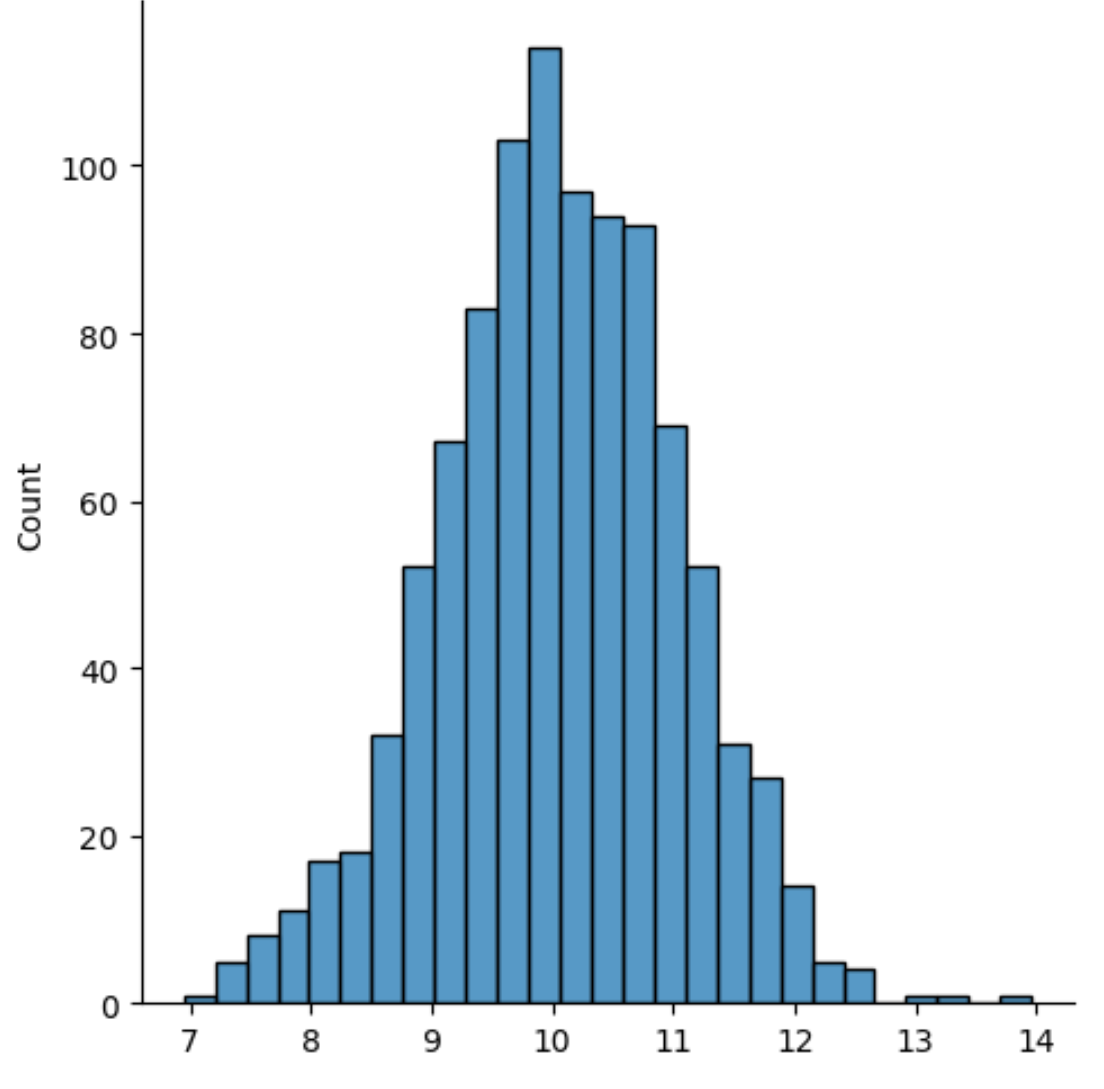
X ဝင်ရိုးသည် ဖြန့်ဖြူးမှုတန်ဖိုးများကိုပြသပြီး Y ဝင်ရိုးသည် တန်ဖိုးတစ်ခုစီ၏ရေတွက်မှုကိုပြသသည်။
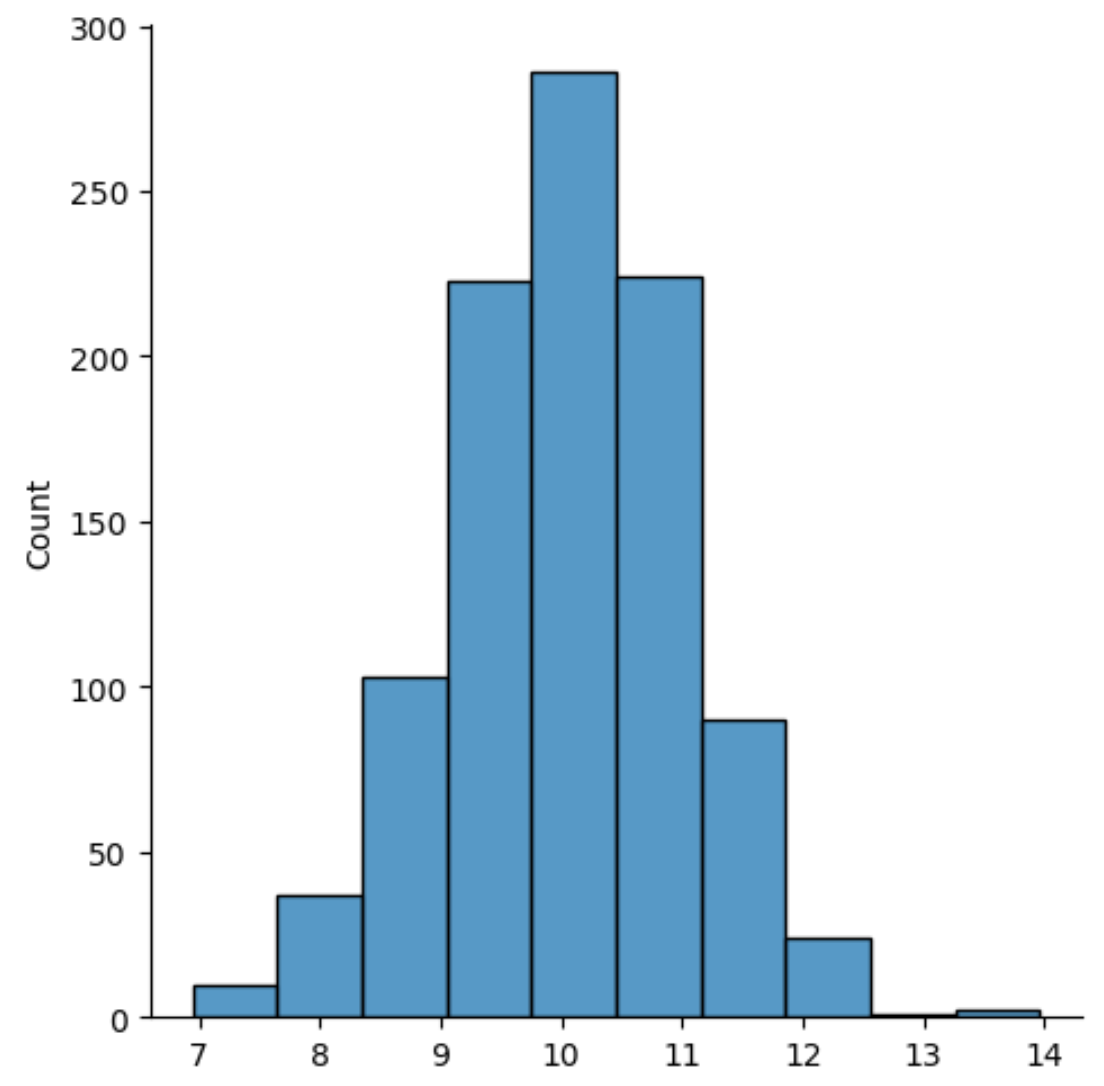
histogram တွင်အသုံးပြုသော bins အရေအတွက်ကို ပြောင်းလဲရန်၊ bins argument ကို အသုံးပြု၍ နံပါတ်တစ်ခုကို သတ်မှတ်နိုင်သည်။
 import seaborn as sns
import numpy as np

#make this example reproducible
n.p. random . seed ( 1 )

#create array of 1000 values that follows a normal distribution with mean of 10
data = np. random . normal (size= 1000 , loc= 10 )

#create histogram using 10 bins
sns. displot (data, bins= 10 )
ဥပမာ 2- Density Curve ကို အသုံးပြု၍ ဖြန့်ဝေမှုကို စီစဉ်ခြင်း။
အောက်ဖော်ပြပါ ကုဒ်သည် density မျဉ်းကွေးကို အသုံးပြု၍ NumPy အခင်းအကျင်းတွင် တန်ဖိုးများ ဖြန့်ဖြူးပုံကို ပုံဖော်နည်းကို ပြသသည်-
 import seaborn as sns
import numpy as np

#make this example reproducible
n.p. random . seed ( 1 )

#create array of 1000 values that follows a normal distribution with mean of 10
data = np. random . normal (size= 1000 , loc= 10 )

#create density curve to visualize distribution of values
sns. displot (data, kind=' kde ')
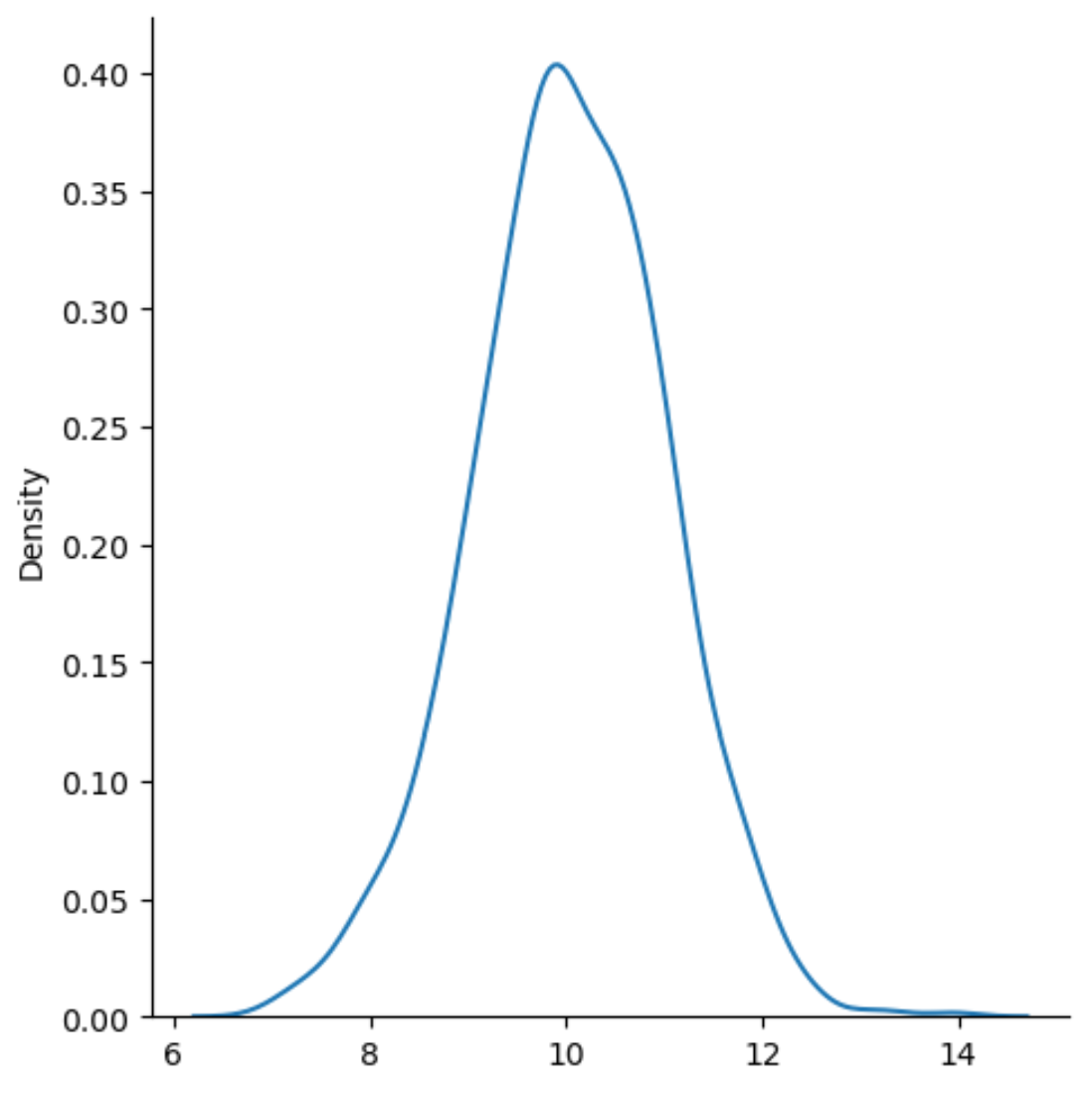
x-axis သည် ဖြန့်ဖြူးမှု၏တန်ဖိုးများကိုပြသပြီး y-axis သည် တန်ဖိုးတစ်ခုစီ၏ နှိုင်းရကြိမ်နှုန်းကိုပြသသည်။
type=’kde’ သည် kernel density ခန့်မှန်းချက်ကို အသုံးပြုရန် seaborn ကပြောသည်၊ ၎င်းသည် variable ၏တန်ဖိုးများခွဲဝေမှုကို အကျဉ်းချုပ်ဖော်ပြသည့်ချောမွေ့သောမျဉ်းကွေးကိုထုတ်ပေးသည်။
ဥပမာ 3- Histogram နှင့် Density Curve ကို အသုံးပြု၍ ဖြန့်ဝေမှုကို စီစဉ်ခြင်း။
အောက်ဖော်ပြပါ ကုဒ်သည် NumPy အခင်းအကျင်းတစ်ခုတွင် တန်ဖိုးများ ဖြန့်ကျက်ပုံကို စီစဥ်ထားသည့် သိပ်သည်းဆမျဉ်းကွေးတစ်ခုပါရှိသော ဟီစတိုဂရမ်ကို အသုံးပြု၍ ပြသသည်-
 import seaborn as sns
import numpy as np

#make this example reproducible
n.p. random . seed ( 1 )

#create array of 1000 values that follows a normal distribution with mean of 10
data = np. random . normal (size= 1000 , loc= 10 )

#create histogram with density curve overlaid to visualize distribution of values
sns. displot (data, kde= True )
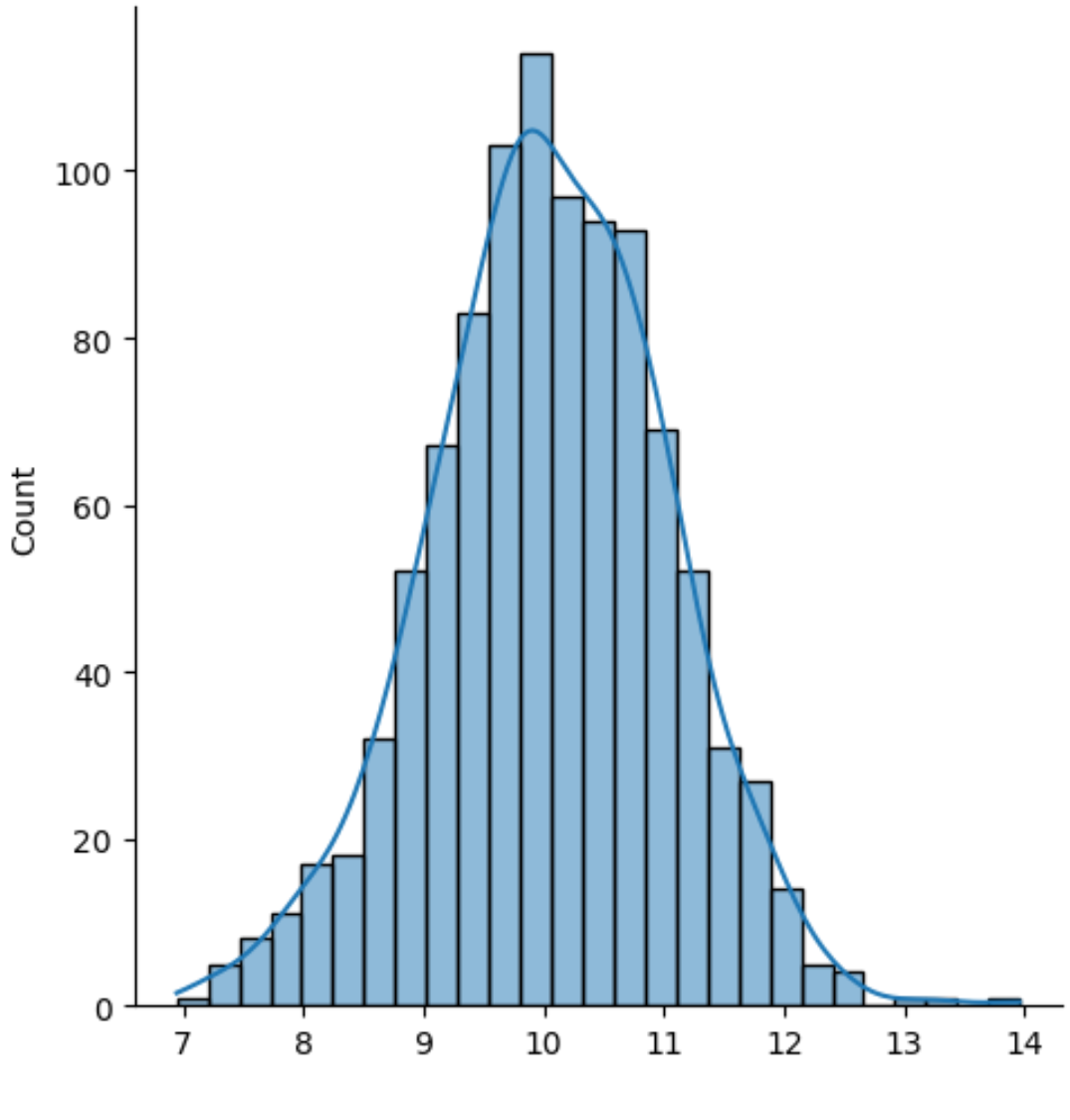
ရလဒ်မှာ သိပ်သည်းဆမျဉ်းကွေးကို တွဲထားသော ဟစ်စတိုဂရမ်တစ်ခုဖြစ်သည်။
မှတ်ချက် – seaborn displot() လုပ်ဆောင်ချက်အတွက် စာရွက်စာတမ်းအပြည့်အစုံကို ဤနေရာတွင် ရှာဖွေနိုင်ပါသည်။
ထပ်လောင်းအရင်းအမြစ်များ
အောက်ဖော်ပြပါ သင်ခန်းစာများသည် seaborn ကို အသုံးပြု၍ အခြားသော အလုပ်များကို မည်သို့လုပ်ဆောင်ရမည်ကို ရှင်းပြသည်-
Seaborn Plots တွင် ခေါင်းစဉ်တစ်ခုထည့်နည်း
Seaborn ကွက်များတွင် ဖောင့်အရွယ်အစားကို မည်သို့ပြောင်းရမည်နည်း။
Seaborn မြေကွက်များတွင် မှင်အရေအတွက်ကို ချိန်ညှိနည်း
စာရေးသူအကြောင်း

Benjamin Anderson
မင်္ဂလာပါ၊ ကျွန်ုပ်သည် အငြိမ်းစား စာရင်းအင်း ပါမောက္ခ ဘင်ဂျမင်ဖြစ်ပြီး သီးသန့် Statorials ဆရာအဖြစ် လှည့်ပတ်ပါသည်။ စာရင်းဇယားနယ်ပယ်တွင် ကျယ်ပြန့်သောအတွေ့အကြုံနှင့် ကျွမ်းကျင်မှုနှင့်အတူ၊ Statorials မှတစ်ဆင့် ကျောင်းသားများကို ခွန်အားဖြစ်စေရန်အတွက် ကျွန်ုပ်၏အသိပညာကို မျှဝေလိုပါသည်။ ပိုသိတယ်။