Matplotlib ရှိ subplot များသို့ စာသားထည့်နည်း
Matplotlib ရှိ သီးခြားအပိုင်းခွဲများသို့ စာသားထည့်ရန် အောက်ပါ syntax ကို သင်အသုံးပြုနိုင်သည်-
 import matplotlib. pyplot as plt

#define subplot layout
fig, ax = plt. subplots (2, 1, figsize=(7,4))

#add text at specific locations in subplots
ax[0]. text (1.5, 20, ' Here is some text in the first subplot ')
ax[1]. text (2, 10, ' Here is some text in the second subplot ')
ဤဥပမာသည် ပထမအပိုင်းခွဲ (x,y) ကိုသြဒိနိတ် (1,5,20) တွင် စာသားနှင့် ဒုတိယအပိုင်းခွဲ (x,y) သြဒိနိတ် (2,10) တွင် စာသားထည့်သည်။
အောက်ဖော်ပြပါ ဥပမာသည် ဤ syntax ကို လက်တွေ့တွင် မည်သို့အသုံးပြုရမည်ကို ပြသထားသည်။
ဥပမာ- Matplotlib ရှိ အပိုင်းခွဲများသို့ စာသားထည့်ပါ။
အောက်ဖော်ပြပါကုဒ်သည် Matplotlib တွင် အတန်းခွဲနှစ်ခုနှင့် ကော်လံတစ်ခုပါသည့် အပြင်အဆင်တစ်ခုဖြင့် စီစဉ်ပေးသည့် ပုံစံခွဲနှစ်ခုကို မည်သို့ဖန်တီးရမည်ကို ပြသသည်-
 import matplotlib. pyplot as plt

#define subplot layout
fig, ax = plt. subplots (2, 1, figsize=(7,4))
fig. tight_layout ()

#define data
x = [1, 2, 3]
y = [7, 13, 24]

#create subplots
ax[0]. plot (x,y,color=' red ')
ax[1]. plot (x,y,color=' blue ')
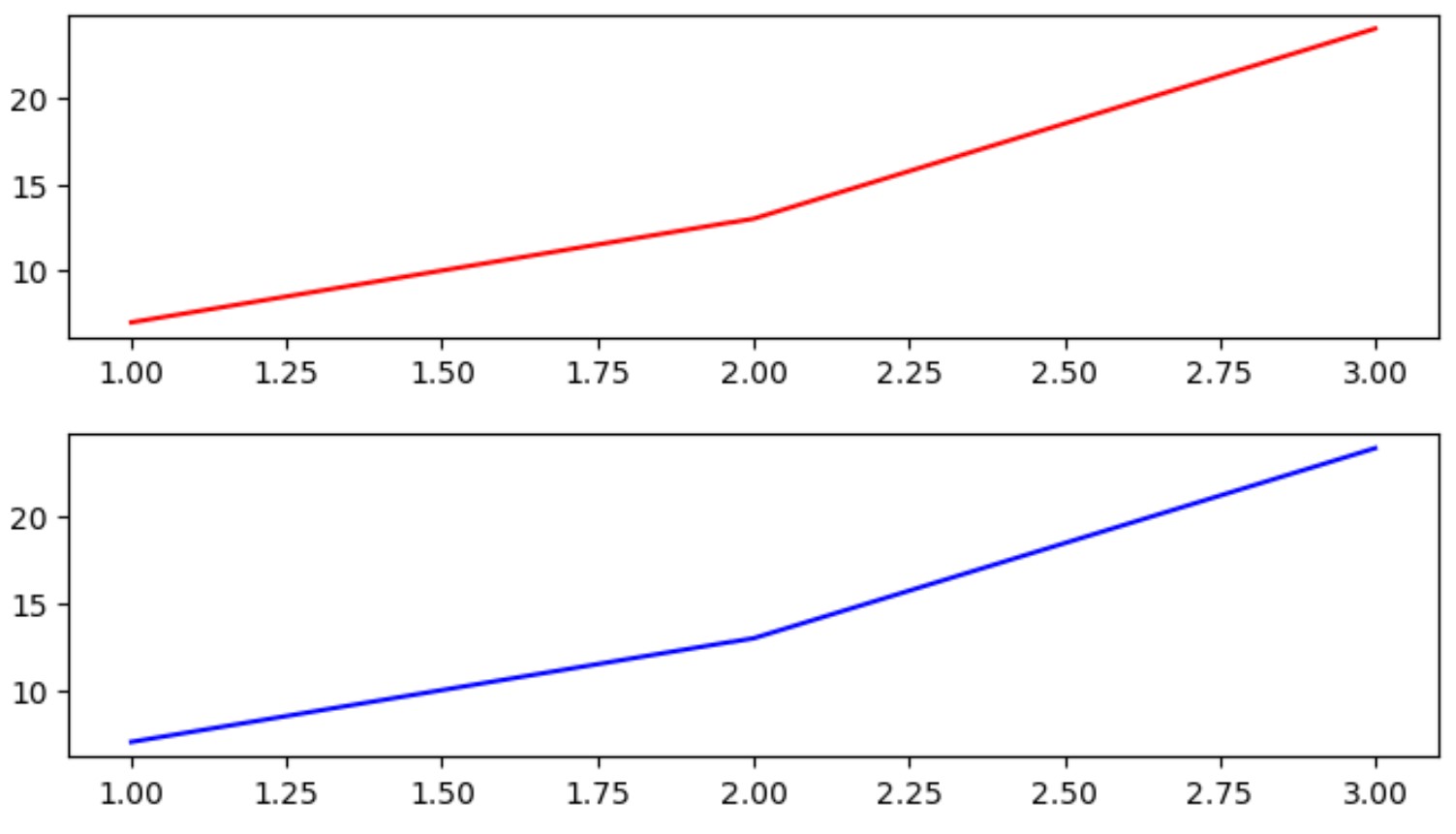
အပိုင်းခွဲတစ်ခုစီရှိ သီးခြားနေရာများတွင် စာသားထည့်ရန် အောက်ပါ syntax ကို အသုံးပြုနိုင်ပါသည်။
 import matplotlib. pyplot as plt

#define subplot layout
fig, ax = plt. subplots (2, 1, figsize=(7,4))
fig. tight_layout ()

#define data
x = [1, 2, 3]
y = [7, 13, 24]

#create subplots
ax[0]. plot (x,y,color=' red ')
ax[1]. plot (x,y,color=' blue ')

#add text at specific locations in subplots
ax[0]. text (1.5, 20, ' Here is some text in the first subplot ')
ax[1]. text (2, 10, ' Here is some text in the second subplot ')
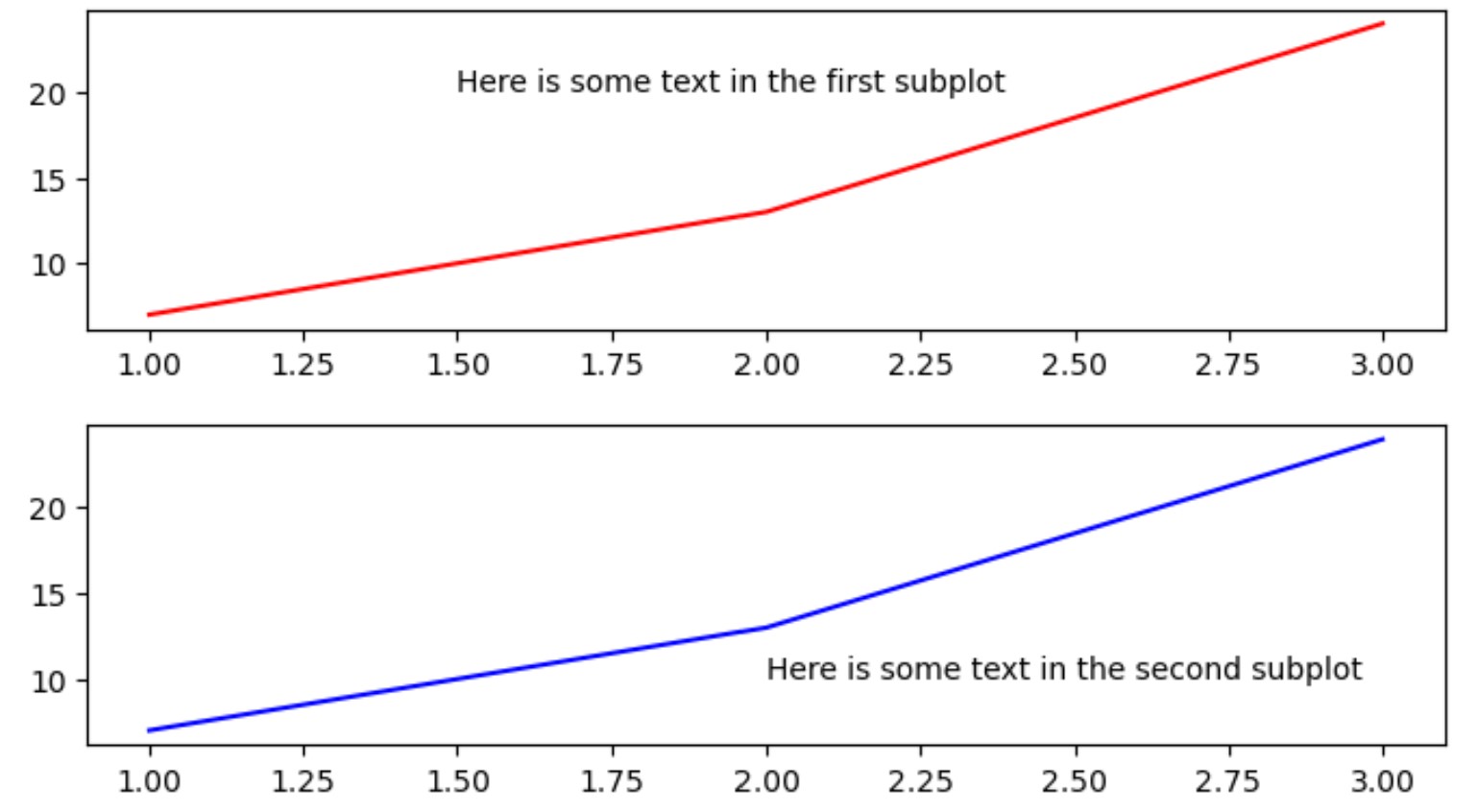
ကျွန်ုပ်တို့သတ်မှတ်ထားသော (x,y) သြဒိနိတ်များတွင် စာသားကို အပိုင်းခွဲတစ်ခုစီတွင် ထည့်သွင်းထားကြောင်း သတိပြုပါ။
ဒုတိယအပိုင်းခွဲကို ကိုးကားရန် ပထမအပိုင်းခွဲနှင့် ပုဆိန် [1] ကို ကိုးကားရန် ax[0] ကို အသုံးပြုခဲ့ကြောင်း သတိပြုပါ။
ထို့နောက် ကျွန်ုပ်တို့သည် (x၊ y) သြဒိနိတ်များနှင့် အပိုင်းခွဲတစ်ခုစီတွင် အသုံးပြုရန် သီးခြားစာသားများကို သတ်မှတ်ရန် text() လုပ်ဆောင်ချက်ကို အသုံးပြုခဲ့သည်။
ထပ်လောင်းအရင်းအမြစ်များ
အောက်ပါသင်ခန်းစာများသည် Matplotlib ရှိ အခြားဘုံအလုပ်များကို မည်သို့လုပ်ဆောင်ရမည်ကို ရှင်းပြသည်-
Matplotlib ရှိ subplot များတွင် ခေါင်းစဉ်တစ်ခုထည့်နည်း
Matplotlib ရှိ subplot အရွယ်အစားကို ချိန်ညှိနည်း
Matplotlib အပိုင်းခွဲများကြား အကွာအဝေးကို ချိန်ညှိနည်း
စာရေးသူအကြောင်း

Benjamin Anderson
မင်္ဂလာပါ၊ ကျွန်ုပ်သည် အငြိမ်းစား စာရင်းအင်း ပါမောက္ခ ဘင်ဂျမင်ဖြစ်ပြီး သီးသန့် Statorials ဆရာအဖြစ် လှည့်ပတ်ပါသည်။ စာရင်းဇယားနယ်ပယ်တွင် ကျယ်ပြန့်သောအတွေ့အကြုံနှင့် ကျွမ်းကျင်မှုနှင့်အတူ၊ Statorials မှတစ်ဆင့် ကျောင်းသားများကို ခွန်အားဖြစ်စေရန်အတွက် ကျွန်ုပ်၏အသိပညာကို မျှဝေလိုပါသည်။ ပိုသိတယ်။