Python တွင် curve fitting (ဥပမာများနှင့်အတူ)
မကြာခဏဆိုသလို သင်သည် Python ရှိ ဒေတာအတွဲတစ်ခုနှင့် မျဉ်းကွေးတစ်ခုကို အံဝင်ခွင်ကျဖြစ်စေလိုပေမည်။
အောက်ဖော်ပြပါ အဆင့်ဆင့် ဥပမာသည် numpy.polyfit() လုပ်ဆောင်ချက်ကို အသုံးပြု၍ Python တွင် မျဉ်းကွေးများကို ဒေတာနှင့် အံဝင်ခွင်ကျဖြစ်အောင် ပြုလုပ်နည်းနှင့် မည်သည့်မျဉ်းကွေးသည် ဒေတာနှင့် ကိုက်ညီကြောင်း ဆုံးဖြတ်နည်းကို ရှင်းပြထားသည်။
အဆင့် 1- ဒေတာကို ဖန်တီးပြီး မြင်ယောင်ကြည့်ပါ။
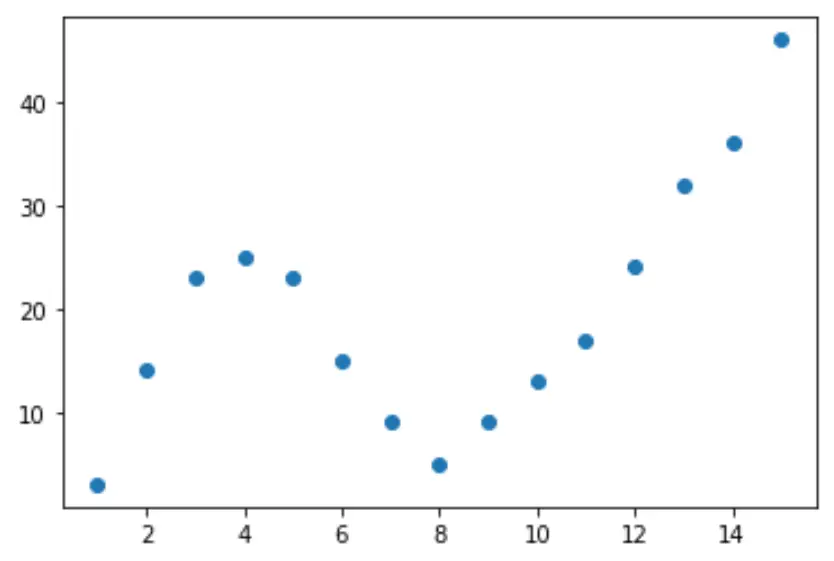
အတုအပဒေတာအတွဲကို ဖန်တီးပြီး ဒေတာကိုမြင်ယောင်နိုင်ရန် အပိုင်းအစတစ်ခုကို ဖန်တီးကြပါစို့။
 import pandas as pd
import matplotlib. pyplot as plt

#createDataFrame
df = pd. DataFrame ({' x ': [1, 2, 3, 4, 5, 6, 7, 8, 9, 10, 11, 12, 13, 14, 15],
                   ' y ': [3, 14, 23, 25, 23, 15, 9, 5, 9, 13, 17, 24, 32, 36, 46]})

#create scatterplot of x vs. y
plt. scatter (df. x , df. y )
အဆင့် 2- မျဉ်းကွေးများစွာကို ချိန်ညှိပါ။
ထို့နောက် ကိန်းဂဏန်းများစွာကို ဆုတ်ယုတ်မှုပုံစံများကို ဒေတာနှင့် အံဝင်ခွင်ကျဖြစ်အောင် တူညီသောကွက်လပ်တွင် မော်ဒယ်တစ်ခုစီ၏ မျဉ်းကွေးကို မြင်ယောင်ကြည့်ကြပါစို့။
 import numpy as np

#fit polynomial models up to degree 5
model1 = np. poly1d (np. polyfit (df. x , df. y , 1))
model2 = np. poly1d (np. polyfit (df. x , df. y , 2))
model3 = np. poly1d (np. polyfit (df. x , df. y , 3))
model4 = np. poly1d (np. polyfit (df. x , df. y , 4))
model5 = np. poly1d (np. polyfit (df. x , df. y , 5))

#create scatterplot
polyline = np. linspace (1, 15, 50)
plt. scatter (df. x , df. y )

#add fitted polynomial lines to scatterplot
plt. plot (polyline, model1(polyline), color=' green ')
plt. plot (polyline, model2(polyline), color=' red ')
plt. plot (polyline, model3(polyline), color=' purple ')
plt. plot (polyline, model4(polyline), color=' blue ')
plt. plot (polyline, model5(polyline), color=' orange ')
plt. show ()
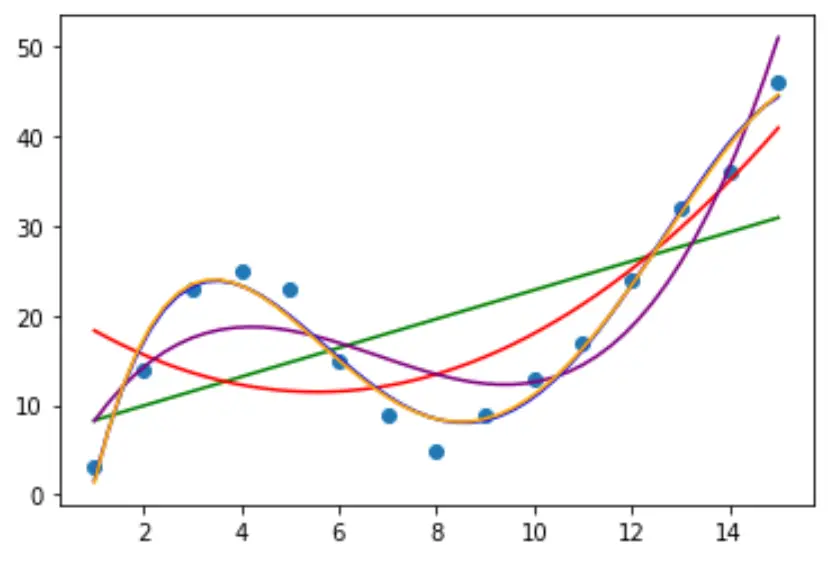
မည်သည့်မျဉ်းကွေးသည် ဒေတာနှင့် ကိုက်ညီကြောင်း ဆုံးဖြတ်ရန်၊ မော်ဒယ်တစ်ခုစီ၏ ချိန်ညှိထားသော R စတုရန်း ကို ကြည့်ရှုနိုင်ပါသည်။
ဤတန်ဖိုးသည် ခန့်မှန်းသူကိန်းရှင်အရေအတွက်အတွက် ချိန်ညှိထားသော မော်ဒယ်ရှိ ခန့်မှန်းသူကိန်းရှင်(များ) က ရှင်းပြနိုင်သည့် တုံ့ပြန်မှုကိန်းရှင်တွင် ကွဲလွဲမှုရာခိုင်နှုန်းကို ပြောပြသည်။
 #define function to calculate adjusted r-squared
def adjR(x, y, degree):
    results = {}
    coeffs = np. polyfit (x, y, degree)
    p = np. poly1d (coeffs)
    yhat = p(x)
    ybar = np. sum (y)/len(y)
    ssreg = np. sum ((yhat-ybar)**2)
    sstot = np. sum ((y - ybar)**2)
    results[' r_squared '] = 1- (((1-(ssreg/sstot))*(len(y)-1))/(len(y)-degree-1))

    return results

#calculated adjusted R-squared of each model
adjR(df. x , df. y , 1)
adjR(df. x , df. y , 2)
adjR(df. x , df. y , 3)
adjR(df. x , df. y , 4)
adjR(df. x , df. y , 5)

{'r_squared': 0.3144819}
{'r_squared': 0.5186706}
{'r_squared': 0.7842864}
{'r_squared': 0.9590276}
{'r_squared': 0.9549709}
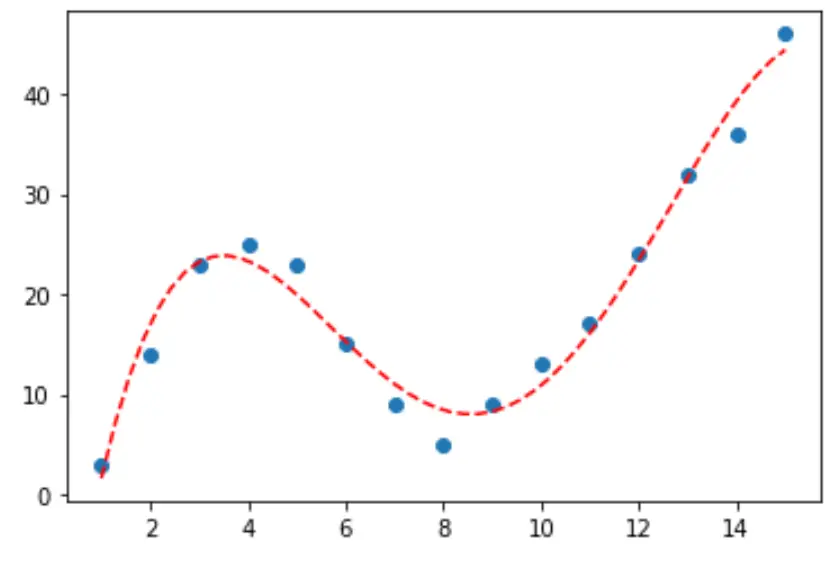
ရလဒ်မှ၊ အမြင့်ဆုံးချိန်ညှိထားသော R-squared ပါသည့်မော်ဒယ်သည် ချိန်ညှိထားသော R-squared 0.959 ရှိသည့် စတုတ္ထဒီဂရီပိုလီနိုမီးယားဖြစ်သည်ကို ကျွန်ုပ်တို့တွေ့နိုင်သည်။
အဆင့် 3- နောက်ဆုံးမျဉ်းကွေးကို မြင်ယောင်ကြည့်ပါ။
နောက်ဆုံးတွင်၊ ကျွန်ုပ်တို့သည် စတုတ္ထဒီဂရီ ကိန်းဂဏန်းပုံစံ၏ မျဉ်းကွေးဖြင့် ဖြန့်ခွဲကွက်တစ်ခုကို ဖန်တီးနိုင်သည်-
 #fit fourth-degree polynomial
model4 = np. poly1d (np. polyfit (df. x , df. y , 4))

#define scatterplot
polyline = np. linspace (1, 15, 50)
plt. scatter (df. x , df. y )

#add fitted polynomial curve to scatterplot
plt. plot (polyline, model4(polyline), ' -- ', color=' red ')
plt. show ()
print() လုပ်ဆောင်ချက်ကို အသုံးပြု၍ ဤစာကြောင်းအတွက် ညီမျှခြင်းကိုလည်း ရနိုင်သည်-
 print (model4)

          4 3 2
-0.01924x + 0.7081x - 8.365x + 35.82x - 26.52
မျဉ်းကွေး၏ညီမျှခြင်းမှာ အောက်ပါအတိုင်းဖြစ်သည်။
y = -0.01924x 4 + 0.7081x 3 – 8.365x 2 + 35.82x – 26.52
မော်ဒယ်ရှိ ကြိုတင်ခန့်မှန်းကိန်းရှင်များကို အခြေခံ၍ တုံ့ပြန်မှုကိန်းရှင် ၏တန်ဖိုးကို ခန့်မှန်းရန် ဤညီမျှခြင်းအား ကျွန်ုပ်တို့အသုံးပြုနိုင်ပါသည်။ ဥပမာ x = 4 ဆိုရင် y = 23.32 ကို ခန့်မှန်းရပါလိမ့်မယ်။
y = -0.0192(4) 4 + 0.7081(4) 3 – 8.365(4) 2 + 35.82(4) – 26.52 = 23.32
ထပ်လောင်းအရင်းအမြစ်များ
Polynomial Regression နိဒါန်း
Python တွင် polynomial regression လုပ်နည်း
စာရေးသူအကြောင်း

Benjamin Anderson
မင်္ဂလာပါ၊ ကျွန်ုပ်သည် အငြိမ်းစား စာရင်းအင်း ပါမောက္ခ ဘင်ဂျမင်ဖြစ်ပြီး သီးသန့် Statorials ဆရာအဖြစ် လှည့်ပတ်ပါသည်။ စာရင်းဇယားနယ်ပယ်တွင် ကျယ်ပြန့်သောအတွေ့အကြုံနှင့် ကျွမ်းကျင်မှုနှင့်အတူ၊ Statorials မှတစ်ဆင့် ကျောင်းသားများကို ခွန်အားဖြစ်စေရန်အတွက် ကျွန်ုပ်၏အသိပညာကို မျှဝေလိုပါသည်။ ပိုသိတယ်။